<?xml version="1.0" encoding="utf-8"?>
<feed xmlns="http://www.w3.org/2005/Atom">

  <title>Pixelbath</title>
  <link href="https://www.pixelbath.com/"/>
  <link rel="self" type="application/atom+xml" href="https://www.pixelbath.com/feed.xml" />
  <updated>2026-05-03T15:46:41.584806+00:00</updated>
  <author>
    <name>Michael Hoskins</name>
  </author>
  <id>https://www.pixelbath.com/</id>

  <entry>
    <title>Building a Static Site Generator</title>
    <link href=""/>
    <id>https://www.pixelbath.com//2026/05/building-a-static-site-generator/</id>
    <updated>2026-05-02T02:04:30.077643+00:00</updated>
    <content type="xhtml" xml:lang="en">
      <div xmlns="http://www.w3.org/1999/xhtml"><p>It's been a while since I posted... well, really <em>anything</em> on my site. I don't know that I could give a single reason (I have considered the possibility I might be lazy, but discarded that idea); the problem is the sum of a number of reasons, some of which I'll lay at the feet of WordPress.</p></div>
    </content>
  </entry>

  <entry>
    <title>C#: Value does not fall within the expected range</title>
    <link href=""/>
    <id>https://www.pixelbath.com//2020/03/csharp-value-does-not-fall-within-expected-range/</id>
    <updated>2020-03-30T02:04:30.077643+00:00</updated>
    <content type="xhtml" xml:lang="en">
      <div xmlns="http://www.w3.org/1999/xhtml"><p>To save anybody from a fruitless internet search, the default message for ArgumentException is the phrase "Value does not fall within the expected range". This error may be returned from various sources, but in my case it was an explicit throw:</p>
<pre><span class="k">if</span><span class="w"> </span><span class="p">(</span><span class="n">someInvalidValue</span><span class="p">)</span>
<span class="p">{</span>
<span class="w">    </span><span class="k">throw</span><span class="w"> </span><span class="k">new</span><span class="w"> </span><span class="nf">ArgumentException</span><span class="p">();</span>
<span class="p">}</span>
</pre>
<p>So if this error is bubbling up, it's an <code>ArgumentException</code>.</p></div>
    </content>
  </entry>

  <entry>
    <title>Fantasy Consoles</title>
    <link href=""/>
    <id>https://www.pixelbath.com//2020/02/fantasy-consoles/</id>
    <updated>2020-02-10T02:04:30.077643+00:00</updated>
    <content type="xhtml" xml:lang="en">
      <div xmlns="http://www.w3.org/1999/xhtml"><p>I'd been meaning to write for my blog, since I'm now posting more regularly on Twitter, and am fairly active in a few Discord chats. Most of what I've been doing lately has been centered around fantasy consoles.</p>
<h2 id="fantasy-consoles">Fantasy Consoles?</h2>
<p>While there are differing opinions on exactly <em>what</em> constitutes a fantasy console, the basic idea is that it's a game development platform for hardware that doesn't exist. In some cases, there are entire <em>systems</em> dedicated to maintaining the illusion that somewhere in an alternative universe, these video game consoles could have existed.</p></div>
    </content>
  </entry>

  <entry>
    <title>ROM Checksums and Headers</title>
    <link href=""/>
    <id>https://www.pixelbath.com//2019/08/rom-checksums-and-headers/</id>
    <updated>2019-08-05T02:04:30.077643+00:00</updated>
    <content type="xhtml" xml:lang="en">
      <div xmlns="http://www.w3.org/1999/xhtml"><p>Lately I've been futzing around with classic game ROMs a bit more. Since nearly day one of Nesticle hitting the Internet, I've been obsessed with emulation of classic computer systems. I love playing old video games, and I love learning more about the internals of the systems I cut my teeth on back in the day.</p></div>
    </content>
  </entry>

  <entry>
    <title>Let's Get Cuddly! (or not, I'm not judging)</title>
    <link href=""/>
    <id>https://www.pixelbath.com//2019/06/visual-studio-cuddly-braces/</id>
    <updated>2019-06-07T02:04:30.077643+00:00</updated>
    <content type="xhtml" xml:lang="en">
      <div xmlns="http://www.w3.org/1999/xhtml"><p>As a personal preference, I'm a fan of cuddly braces. It's the way I learned, but I feel like it leads to more concise and readable code in most cases. I could go on, but as a topic it's been beaten to death, and there are arguments with merit on both sides.</p>
<p>That being said, at work we use newline braces, and I don't like it. A good programmer follows the in-place coding style, so that's what I've been doing. It doesn't mean I have to like it, though. While I use a separate installation of Visual Studio on an entirely different computer for coding my personal projects, there are times where I'd like to not have to completely switch machines to bang out some lines of code.</p>
<p>After reading that you can export and import Visual Studio settings, I created two settings files trimmed down to only include indentation and newline settings, so now I can simply import a settings file and all the rules I want changed are changed.</p>
<p>Feel free to edit the below files to your needs:</p>
<ul>
<li><a <a class="button-std file-icon icon-vssettings" href="/downloads/VS_Personal.vssettings">VS_Personal.vssettings</a> (3.6k): Cuddly style</li>
<li><a <a class="button-std file-icon icon-vssettings" href="/downloads/VS_Work.vssettings">VS_Work.vssettings</a> (3.6k):  Non-cuddly style (braces on newlines)</li>
</ul>
<p>These are only for Visual Studio, though. I've got nothing to offer for other editors, but feel free to contribute settings files for any other IDE.</p></div>
    </content>
  </entry>

  <entry>
    <title>PSA: Vertex and Vertices</title>
    <link href=""/>
    <id>https://www.pixelbath.com//2019/05/psa-vertex-and-vertices/</id>
    <updated>2019-05-28T02:04:30.077643+00:00</updated>
    <content type="xhtml" xml:lang="en">
      <div xmlns="http://www.w3.org/1999/xhtml"><p>Hey everybody, just a quick reminder <strong>that the singular form of vertices is <em>vertex</em></strong>. There is no such thing as a "vertice".</p>
<div class="image-caption alignright">
<img alt='the singular form of "vertices" is "vertex"' src="/images/vertices-wrong-word.png" />
</div>

<p>I've heard it pronounced this way in some...specific 😉 video tutorials, but recently I've noticed this malapropism being used in written tutorials as well.</p></div>
    </content>
  </entry>

  <entry>
    <title>The Importance of Order</title>
    <link href=""/>
    <id>https://www.pixelbath.com//2019/03/the-importance-of-order/</id>
    <updated>2019-03-30T02:04:30.077643+00:00</updated>
    <content type="xhtml" xml:lang="en">
      <div xmlns="http://www.w3.org/1999/xhtml"><p>The order of things is important; even moreso when those things are command line arguments.</p>
<p><img alt="the venerable Blender default cube" class="aligncenter" src="/images/default-cube-render.png" /></p>
<p>After spending way too long (~30 minutes) trying to figure out why my background Blender renders were producing default cubes when that is clearly not what is in the scene, I finally looked at the console output and understood.</p>
<p><code>blender --background --python script.py myfile.blend</code></p>
<p>What this command does is tells Blender, "Load into memory as a background process and run script.py (which changes some settings and starts a render). <em>Then</em> load myfile.blend." Once the file is loaded, background Blender exits.</p>
<p>In the proper order:</p>
<p><code>blender myfile.blend --background --python script.py</code></p></div>
    </content>
  </entry>

  <entry>
    <title>PHP PDF Libraries</title>
    <link href=""/>
    <id>https://www.pixelbath.com//2015/04/php-pdf-libraries/</id>
    <updated>2015-04-01T02:04:30.077643+00:00</updated>
    <content type="xhtml" xml:lang="en">
      <div xmlns="http://www.w3.org/1999/xhtml"><div class="image-caption alignright">

<img alt="PDFs are easy! Like riding a...oh." src="/images/pdf-bike-crash.jpg" />

<p>PDFs are easy! Like riding a...oh.</p>
</div>

<p>I wanted to do something I figured would be relatively simple. After all, we're doing it in .Net with a third-party library: Create a PDF with text from a database with vector graphics incorporated in the page. Turns out, it's pretty easy if you want a paid solution; numerous libraries exist for PHP that are non-free. If you insist on going free-only though, be warned: here be dragons (maybe).</p></div>
    </content>
  </entry>

  <entry>
    <title>HP Color LaserJet 3600 Windows 7/8/8.1</title>
    <link href=""/>
    <id>https://www.pixelbath.com//2014/08/hp-color-laserjet-3600-windows-788-1/</id>
    <updated>2014-08-07T02:04:30.077643+00:00</updated>
    <content type="xhtml" xml:lang="en">
      <div xmlns="http://www.w3.org/1999/xhtml"><p>I honestly don't know why HP hates its customers. They assume I want to use USB to connect a business printer, or want ~140MB for a driver, or want some other print management software instead of just a driver.</p>
<p>So here you go. The HP Color LaserJet 3600 64-bit driver for Windows 7, 8, and 8.1.</p>
<p><a <a class="button-std file-icon icon-zip" href="/downloads/HP3600_64_Bit.zip">HP3600_64_Bit.zip</a> (14.2 MB)</p></div>
    </content>
  </entry>

  <entry>
    <title>SimpLESS: An Easier Way of Getting LESS Done</title>
    <link href=""/>
    <id>https://www.pixelbath.com//2013/02/simpless-an-easier-way-of-getting-less-done/</id>
    <updated>2013-02-26T02:04:30.077643+00:00</updated>
    <content type="xhtml" xml:lang="en">
      <div xmlns="http://www.w3.org/1999/xhtml"><p><img alt="LESS" class="aligncenter" src="/images/less-css.jpg" /></p>
<p>When I first took a look at LESS as a CSS replacement, I wasn't too interested in having even a command-line compiler. The idea of having my stylesheet loaded and parsed by Javascript didn't sound that great either, but tolerable if it saved me enough time and effort writing CSS.</p>
<p><img alt="simpless" class="alignright" src="/images/simpless.png" /></p>
<p>While testing LESS on my local server, I used <code>less.js</code> to process my <code>.less</code> stylesheet on the client side. It worked well, and on modern browsers the processing time is minimal, but I decided to look around for LESS compilers anyway. I discovered <a href="SimpLESS">http://wearekiss.com/simpless</a> nearly immediately, and it looked perfect.</p>
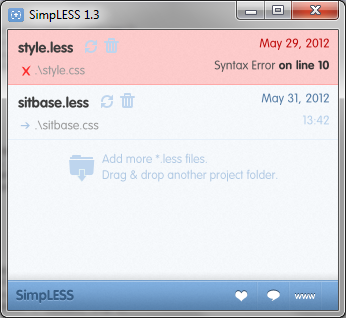
<p>Compiling a <code>.less</code> file is as easy as drag-and-drop, and it monitors the file for changes. When your file is saved, it is nearly immediately compiled into a CSS file. If you've made an error in your file, the file highlights red and specifies the line number at which the problem occurred. Output is pure, minified CSS goodness.</p>
<p>SimpLESS, by default, inserts a comment at the top referring to its website. This can easily be disabled if you like.</p>
<p>When I first started using SimpLESS, I was copying and pasting the output into a WordPress template style.css file, which requires a properly-formatted comment at the top to describe the theme. Since SimpLESS performs minification, comments are stripped out. I thought this was the only way to keep my WordPress theme comment intact while still using the features of LESS. This copy-paste tedium was something I specifically wanted to avoid in the first place.</p>
<p><strong>Note: The remainder of this post was written before SimpLESS users complained enough about this very issue, so theme comment preservation is no longer an issue.</strong></p>
<p>I thought that there must be some way to preserve a comment when compiling. Surely that wasn't an uncommon use case? I checked out the <a href="SimpLESS source code">https://github.com/Paratron/SimpLESS</a> to see how it was performing its minification (<code>master/Resources/js/clean_css.js, line 30</code> if you're interested), and saw they included a special character to preserve certain comments: the exclamation mark.</p>
<p>To preserve a CSS comment in SimpLESS (not that this will not work using the Javascript version, as WordPress will not find a <code>style.less</code> file), simply put an exclamation point after the initial comment delimiter, like so:</p>
<pre><span class="c">/*!</span>
<span class="c">Theme Name: My Super-Cool Theme</span>
<span class="c">Theme URI: https://www.pixelbath.com/</span>
<span class="c">Description: Blah blah blah...</span>
<span class="c">[cut for length]</span>
<span class="c">*/</span>
</pre>
<p>The exclamation point is ignored by WordPress, and if you have SimpLESS processing your <code>style.less</code> file, you can continue to upload your theme's <code>style.css</code> file as usual.</p></div>
    </content>
  </entry>

  <entry>
    <title>Clear Photoshop's Swatch Palette</title>
    <link href=""/>
    <id>https://www.pixelbath.com//2012/04/clear-photoshops-swatch-palette/</id>
    <updated>2012-04-13T02:04:30.077643+00:00</updated>
    <content type="xhtml" xml:lang="en">
      <div xmlns="http://www.w3.org/1999/xhtml"><div class="image-caption alignright">

<img alt="The Photoshop swatch palette" src="/images/photoshop-swatch-palette.png" />

Everybody wants a rainbow, apparently.

</div>

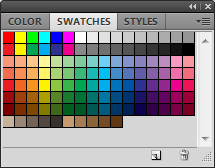
<p>Whether you're trying to save a specific set of colors for later use, or simply want a palette with only your colors on it, you'll likely have encountered a problem that has been plaguing Photoshop for as long as I remember, and still hasn't been addressed in CS5 (or CS5.5, that I know of): <strong>how do you clear the swatch palette</strong>?</p></div>
    </content>
  </entry>

  <entry>
    <title>After Effects: Fullscreen Preview</title>
    <link href=""/>
    <id>https://www.pixelbath.com//2011/03/after-effects-fullscreen-preview/</id>
    <updated>2011-03-03T02:04:30.077643+00:00</updated>
    <content type="xhtml" xml:lang="en">
      <div xmlns="http://www.w3.org/1999/xhtml"><p>If you actually bother preemptively reading your software documentation, you may have already known this, but this is a huge time-saver over having to render test movies for my HDTV.</p>
<p>At work, I'm using a 27" 1080p monitor/television as my secondary monitor. We use a model that has a similar color profile for presentations, so using this screen as a preview screen is essential. Otherwise, we'd have to keep our presentation displays unpacked and hooked up to a computer, transfer files, and so on. I won't get into (more) details, but suffice to say it would be a royal pain.</p></div>
    </content>
  </entry>

  <entry>
    <title>.htaccess Snippets</title>
    <link href=""/>
    <id>https://www.pixelbath.com//2009/05/htaccess-snippets/</id>
    <updated>2009-05-29T02:04:30.077643+00:00</updated>
    <content type="xhtml" xml:lang="en">
      <div xmlns="http://www.w3.org/1999/xhtml"><p>Here are some .htaccess snippets I've had to use, and if you run your own site, blog, or some other third thing, you might find them useful.</p>
<p><strong>Moved from one URL to another:</strong> My old blog url used to be verbose.pixelbath.com, and before that was pixelbath.com/verbose. Setting aside the notion that this blog moves around too much, the following snippet…</p>
<pre><span class="nb">RewriteEngine</span><span class="w"> </span><span class="k">on</span>
<span class="nb">RewriteCond</span><span class="w"> </span>%{HTTP_HOST}<span class="w"> </span>^verbose<span class="w"> </span>[NC]
<span class="nb">RewriteRule</span><span class="w"> </span>^(.*)$<span class="w"> </span>https://www.pixelbath.com/blog/<span class="w"> </span>[R=301,L]
</pre>
<p>…redirects any host name containing ‘verbose' will be redirected to the main blog URL. Useful because many sites had me linked to the old blog, and I didn't want to break their links too badly. Nothing fancy, so please note that this does not transfer url parameters. It only redirects requests with the single word ‘verbose' to the main blog URL.</p>
<p><strong>Using a single file to handle all URL requests:</strong> If you've used almost any PHP <acronym title="Content Management System">CMS</acronym> or <acronym title="Model-View-Controller">MVC</acronym> framework such as CodeIgniter or CakePHP, you've probably used something like this for “search friendly URLs”:</p>
<pre><span class="nb">RewriteEngine</span><span class="w"> </span><span class="k">On</span>
<span class="nb">RewriteBase</span><span class="w"> </span><span class="sx">/blog/</span>
<span class="nb">RewriteCond</span><span class="w"> </span>%{REQUEST_FILENAME}<span class="w"> </span>!-f
<span class="nb">RewriteCond</span><span class="w"> </span>%{REQUEST_FILENAME}<span class="w"> </span>!-d
<span class="nb">RewriteRule</span><span class="w"> </span>(.+)<span class="w"> </span><span class="sx">/blog/index.php</span><span class="w"> </span>[L]
</pre>
<p>What this does is start from the <code>/blog/</code> folder, and handle any requests under that. The first RewriteCond sets our rule to not apply to any physical files matching the request, and the second does the same for physical directories.</p>
<p>Once it passes the two conditions (a request in <code>/blog/</code> that is not a physical file or directory), it goes to the <code>RewriteRule</code>, which simply takes all matching requests and redirect them internally to <code>/blog/index.php</code>. This is not a browser redirect, so the user will still see the URL the way they found it, something like <code>http://example.com/blog/archive/foo</code>. I use this technique on the comics pages by parsing the URL segments into comic and page requests.</p>
<p><strong>Stop image and/or content hotlinking:</strong> Some netizens are either not savvy with the way the Internet works, or don't give a crap because idiocy prefers the low-hanging fruit. Either way, I've actually got a few snippets for this purpose.</p>
<pre><span class="nb">RewriteEngine</span><span class="w"> </span><span class="k">On</span>
<span class="nb">RewriteCond</span><span class="w"> </span>%{HTTP_REFERER}<span class="w"> </span>!^http://(.+\.)?myspace.com<span class="w"> </span>[NC,OR]
<span class="nb">RewriteCond</span><span class="w"> </span>%{HTTP_REFERER}<span class="w"> </span>!^http://(.+\.)?blogspot.com<span class="w"> </span>[NC]
<span class="nb">RewriteRule</span><span class="w"> </span>^.*$<span class="w"> </span>http://www.yourdomain.com/<span class="w"> </span>[R,L]
</pre>
<p>The preceding snippet will block specific websites and their subdomains from hotlinking from your site, but will allow any other site not specified in your <code>.htaccess</code> file to do so. If you'd prefer to stick another image in place of the hotlinked one, this is easily done:</p>
<pre><span class="nb">RewriteEngine</span><span class="w"> </span><span class="k">On</span>
<span class="nb">RewriteCond</span><span class="w"> </span>%{HTTP_REFERER}<span class="w"> </span>!^http://(.+\.)?yourdomain\.com/<span class="w"> </span>[NC]
<span class="nb">RewriteCond</span><span class="w"> </span>%{HTTP_REFERER}<span class="w"> </span>!^$
<span class="nb">RewriteRule</span><span class="w"> </span>.*\.(jpe?g|gif|bmp|png)$<span class="w"> </span><span class="sx">/images/horrifying-image.jpg</span><span class="w"> </span>[L]
</pre>
<p>This one will take any request with a referer not originating from your domain, or blank referers (because some users do legitimately blank their referer string), and redirect them to an image elsewhere on your site. This will work “inline” and display whichever image you specify on outside sites.</p>
<p>If you'd prefer to be plain and simple though, you can just set HTTP code 403 (Forbidden) on any image for any of the rewrites in this section. Simply replace the <code>RewriteRule</code> of each with:</p>
<pre><span class="nb">RewriteRule</span><span class="w"> </span>.*\.(jpe?g|gif|bmp|png)$<span class="w"> </span>-<span class="w"> </span>[F]
</pre>
<p>Which simply sets any request for any image to 403 (Forbidden). Obviously, it should be used in conjunction with <code>RewriteCond</code>s.</p></div>
    </content>
  </entry>

  <entry>
    <title>Host-Based Ad Blocking</title>
    <link href=""/>
    <id>https://www.pixelbath.com//2009/01/host-based-ad-blocking/</id>
    <updated>2009-01-23T02:04:30.077643+00:00</updated>
    <content type="xhtml" xml:lang="en">
      <div xmlns="http://www.w3.org/1999/xhtml"><p>To block ads on the web, we need to catch requests to a particular ad server and send them to our local server. We do this by adding an entry to the <a href="https://en.wikipedia.org/wiki/Hosts_file">hosts file</a>. The hosts file on a computer system gives the system information about where to find a computer on the network by mapping hostnames to IP addresses. For our purposes, we will be taking advantage of this by routing requests to ad servers from webpages to our personal system.</p>
<p>These steps will require that you have Apache HTTP server (or IIS with ISAPI_rewrite, something that can rewrite URLs) running on your local machine (or on a system with low latency, possibly on your network).</p></div>
    </content>
  </entry>

</feed>