Texturing
In addition to color, texture is an important element defining the surface of an object in the real world, and detailed pixel art is no different. Large, solid blocks of color can work well as a cartoony style, but texture adds detail and character.
Brick Wall
Here's a small brick wall to get started. Once the basic brick lines are in place, the pattern can usually be copied and pasted to save some effort. Once basic lines are in place, then you can start adding detail to individual areas.
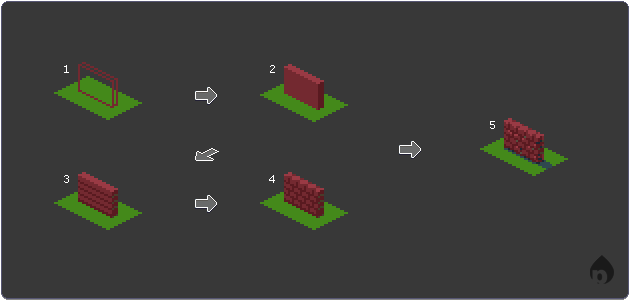 4.1: Brick wall steps.
To illustrate, here's how I drew the small wall above:
- Basic outline: it's a really thin cube! You can scale this up if you're going for larger scale; the idea is the same regardless.
- Color: Add some solid red shades according to the light source.
- Bricklayer: Brick patterns are laid in layers, so draw a series of horizontal lines evenly spaced apart. Try your best to get it to line up vertically, but if it doesn't you can either: adjust the height of the wall to match the pattern, or hide the spacing in some way. Here, I started from the top and hid the 1px gap with extra darkness.
- Brick pattern: Brick pattern alternates every row, but the pattern repeats every other row. Again, try your best to get these spaced, but masons actually do cut bricks to fit sometimes, so don't sweat it too much.
- Polish: Bricks are a rough surface, so adding a few highlights and darker colors inside the mortar lines can help break up the regularity and add detail. I added a shadow and added some darker colors in the shadows to strengthen the lighting.
The remainder of this content is being revised.