.htaccess Snippets

Categories: programming

Here are some .htaccess snippets I've had to use, and if you run your own site, blog, or some other third thing, you might find them useful.

Moved from one URL to another: My old blog url used to be verbose.pixelbath.com, and before that was pixelbath.com/verbose. Setting aside the notion that this blog moves around too much, the following snippet…

RewriteEngine on
RewriteCond %{HTTP_HOST} ^verbose [NC]
RewriteRule ^(.*)$ https://www.pixelbath.com/blog/ [R=301,L]

…redirects any host name containing ‘verbose' will be redirected to the main blog URL. Useful because many sites had me linked to the old blog, and I didn't want to break their links too badly. Nothing fancy, so please note that this does not transfer url parameters. It only redirects requests with the single word ‘verbose' to the main blog URL.

Using a single file to handle all URL requests: If you've used almost any PHP CMS or MVC framework such as CodeIgniter or CakePHP, you've probably used something like this for “search friendly URLs”:

RewriteEngine On
RewriteBase /blog/
RewriteCond %{REQUEST_FILENAME} !-f
RewriteCond %{REQUEST_FILENAME} !-d
RewriteRule (.+) /blog/index.php [L]

What this does is start from the /blog/ folder, and handle any requests under that. The first RewriteCond sets our rule to not apply to any physical files matching the request, and the second does the same for physical directories.

Once it passes the two conditions (a request in /blog/ that is not a physical file or directory), it goes to the RewriteRule, which simply takes all matching requests and redirect them internally to /blog/index.php. This is not a browser redirect, so the user will still see the URL the way they found it, something like http://example.com/blog/archive/foo. I use this technique on the comics pages by parsing the URL segments into comic and page requests.

Stop image and/or content hotlinking: Some netizens are either not savvy with the way the Internet works, or don't give a crap because idiocy prefers the low-hanging fruit. Either way, I've actually got a few snippets for this purpose.

RewriteEngine On
RewriteCond %{HTTP_REFERER} !^http://(.+\.)?myspace.com [NC,OR]
RewriteCond %{HTTP_REFERER} !^http://(.+\.)?blogspot.com [NC]
RewriteRule ^.*$ http://www.yourdomain.com/ [R,L]

The preceding snippet will block specific websites and their subdomains from hotlinking from your site, but will allow any other site not specified in your .htaccess file to do so. If you'd prefer to stick another image in place of the hotlinked one, this is easily done:

RewriteEngine On
RewriteCond %{HTTP_REFERER} !^http://(.+\.)?yourdomain\.com/ [NC]
RewriteCond %{HTTP_REFERER} !^$
RewriteRule .*\.(jpe?g|gif|bmp|png)$ /images/horrifying-image.jpg [L]

This one will take any request with a referer not originating from your domain, or blank referers (because some users do legitimately blank their referer string), and redirect them to an image elsewhere on your site. This will work “inline” and display whichever image you specify on outside sites.

If you'd prefer to be plain and simple though, you can just set HTTP code 403 (Forbidden) on any image for any of the rewrites in this section. Simply replace the RewriteRule of each with:

RewriteRule .*\.(jpe?g|gif|bmp|png)$ - [F]

Which simply sets any request for any image to 403 (Forbidden). Obviously, it should be used in conjunction with RewriteConds.

C#: Value does not fall within the expected range

Categories: programming

To save anybody from a fruitless internet search, the default message for ArgumentException is the phrase "Value does not fall within the expected range". This error may be returned from various sources, but in my case it was an explicit throw:

if (someInvalidValue)
{
    throw new ArgumentException();
}

So if this error is bubbling up, it's an ArgumentException.

Fantasy Consoles

Categories: programming

I'd been meaning to write for my blog, since I'm now posting more regularly on Twitter, and am fairly active in a few Discord chats. Most of what I've been doing lately has been centered around fantasy consoles.

Fantasy Consoles?

While there are differing opinions on exactly what constitutes a fantasy console, the basic idea is that it's a game development platform for hardware that doesn't exist. In some cases, there are entire systems dedicated to maintaining the illusion that somewhere in an alternative universe, these video game consoles could have existed.

Let's Get Cuddly! (or not, I'm not judging)

Categories: programming

As a personal preference, I'm a fan of cuddly braces. It's the way I learned, but I feel like it leads to more concise and readable code in most cases. I could go on, but as a topic it's been beaten to death, and there are arguments with merit on both sides.

That being said, at work we use newline braces, and I don't like it. A good programmer follows the in-place coding style, so that's what I've been doing. It doesn't mean I have to like it, though. While I use a separate installation of Visual Studio on an entirely different computer for coding my personal projects, there are times where I'd like to not have to completely switch machines to bang out some lines of code.

After reading that you can export and import Visual Studio settings, I created two settings files trimmed down to only include indentation and newline settings, so now I can simply import a settings file and all the rules I want changed are changed.

Feel free to edit the below files to your needs:

These are only for Visual Studio, though. I've got nothing to offer for other editors, but feel free to contribute settings files for any other IDE.


ROM Checksums and Headers

Categories: programming

Lately I've been futzing around with classic game ROMs a bit more. Since nearly day one of Nesticle hitting the Internet, I've been obsessed with emulation of classic computer systems. I love playing old video games, and I love learning more about the internals of the systems I cut my teeth on back in the day.

SimpLESS: An Easier Way of Getting LESS Done

Categories: open source software, programming

LESS

When I first took a look at LESS as a CSS replacement, I wasn't too interested in having even a command-line compiler. The idea of having my stylesheet loaded and parsed by Javascript didn't sound that great either, but tolerable if it saved me enough time and effort writing CSS.

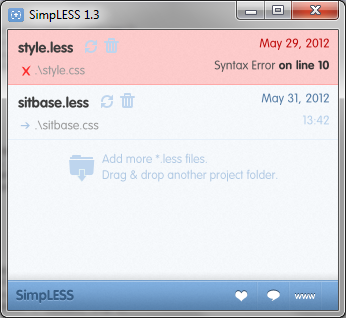
simpless

While testing LESS on my local server, I used less.js to process my .less stylesheet on the client side. It worked well, and on modern browsers the processing time is minimal, but I decided to look around for LESS compilers anyway. I discovered http://wearekiss.com/simpless nearly immediately, and it looked perfect.

Compiling a .less file is as easy as drag-and-drop, and it monitors the file for changes. When your file is saved, it is nearly immediately compiled into a CSS file. If you've made an error in your file, the file highlights red and specifies the line number at which the problem occurred. Output is pure, minified CSS goodness.

SimpLESS, by default, inserts a comment at the top referring to its website. This can easily be disabled if you like.

When I first started using SimpLESS, I was copying and pasting the output into a WordPress template style.css file, which requires a properly-formatted comment at the top to describe the theme. Since SimpLESS performs minification, comments are stripped out. I thought this was the only way to keep my WordPress theme comment intact while still using the features of LESS. This copy-paste tedium was something I specifically wanted to avoid in the first place.

Note: The remainder of this post was written before SimpLESS users complained enough about this very issue, so theme comment preservation is no longer an issue.

I thought that there must be some way to preserve a comment when compiling. Surely that wasn't an uncommon use case? I checked out the https://github.com/Paratron/SimpLESS to see how it was performing its minification (master/Resources/js/clean_css.js, line 30 if you're interested), and saw they included a special character to preserve certain comments: the exclamation mark.

To preserve a CSS comment in SimpLESS (not that this will not work using the Javascript version, as WordPress will not find a style.less file), simply put an exclamation point after the initial comment delimiter, like so:

/*!
Theme Name: My Super-Cool Theme
Theme URI: https://www.pixelbath.com/
Description: Blah blah blah...
[cut for length]
*/

The exclamation point is ignored by WordPress, and if you have SimpLESS processing your style.less file, you can continue to upload your theme's style.css file as usual.